
Download | Official WordPress Plugin Page
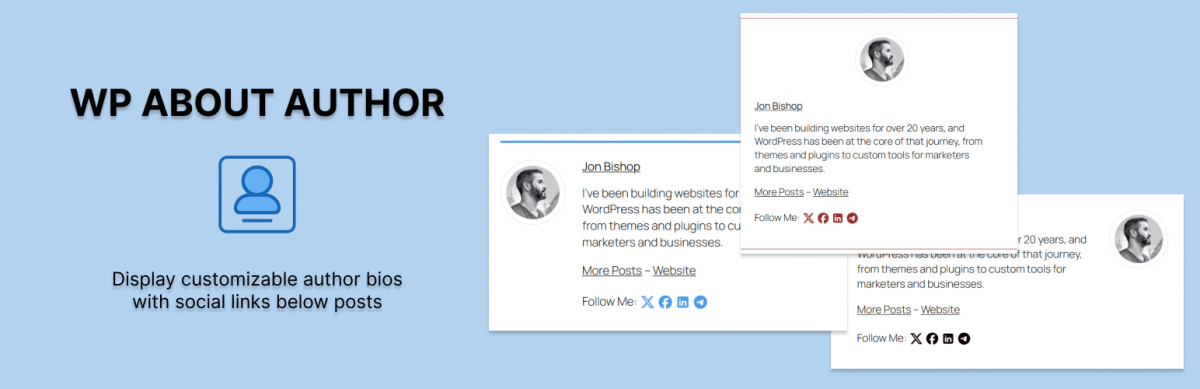
This plugin is the easiest way to add a customizable author bio below your posts. The plugin works right out of the box with WordPress built in profiles.
Customization capabilities include
- Three border styles to match any theme
- Change background color with easy to use color picker
- Display settings allow you to control when to display author bios
- Display text links or icons to a users social media profiles
- Change the size and shape of your avatar
This plugin also expands your profile page by adding fields for popular social media services so it’s easier for readers to follow your authors.
Check out some screenshots of WP About Author on WordPress.org
Installation
- Upload the ‘wp-about-author’ folder to the ‘/wp-content/plugins/’ directory
- Activate the plugin through the ‘Plugins’ menu in WordPress
- Edit your WordPress user profile
- Use the settings page to choose when to display bios
169 replies on “WP About Author”
Hey Jon,
Great stuff. You doing a fantastic job.
Love the plugin, but it stops another plugin (Retweetmeme Button) from working (no more retweets are counted). Any solution for this?
Still having this problem? I’ll look into it.
No, I’m sorry. It wasn’t your plugin, it was a server problem with retweet 🙂
the author plugin is working fine, although it should be nice to have an option to add more fields. I know manually added/changed some.
Thanks. I’ll figure out an easy way to do that.
Where do we put our photo to appear in the plugin box? I can’t find a place to do that anywhere in wordpress admin. Thanks
The photo is displayed using Gravatar.com.
Go to http://en.gravatar.com/site/signup/ and set up your account and you will be all set.
You can learn more about Gravatars and WordPress here: http://codex.wordpress.org/Using_Gravatars
To show your photo.
Install the plugin: http://wordpress.org/extend/plugins/user-photo/
Change the option: Override Avatar with User Photo
This work for me.
Regards,
Rodrigo
Dear Rodrigo,
how did you get the plugin to override the Avatar with User Photo? I have now idea how it’s done. Thanks in advance for your help!!
Best 🙂
To show your photo, is easy, follow these steps:
1 – install the plugin “User Photo” from http://wordpress.org/extend/plugins/user-photo/
2 – Active the plugin
3 – Upload your photo using profile page (a new button to upload photo image)
4 – Access admin panel Config -> User Photo
Check the option “Serve Avatar as Fallback:” and “Override Avatar with User Photo:”
5 – See the result (tested with wordress 3.0.3)
Best Regards,
Rodrigo
I have followed all of your steps. I cannot get it to over ride and use my own photo with this plug in.
I am at a loss. 🙁
I am going to give it another try before I deactivate.
I have a gravatar account and have it set up to show the proper image for a few different emails. When I first installed this plugin it worked fine, but now I am getting the default (generated) images.
My proper gravatar displays in comments but not in the author box. Am I missing a setting? Also, is there a text that says “About the author” or does it just jump in with the name?
Thanks
Thanks for pointing this out. I can’t recreate the issue myself but I see what you are talking about on your website.
It seems as if the get_avatar function is adding
"%20%20class=to the image link. I’ll try and figure out why this happening and will update the code.Jon, Anyway to turn the Gravatar/photo function off? I like the look of the plug-in, but would prefer bio sans pictures.
I’ll try and incorporate this into a future version. The ultimate plan is to allow the user to completely edit the look of author bio using template tags.
Jon–I updated the new release. Were you able to figure out the issue with the plug in pulling the generic gravatar for the author box but the “real” avatar for the comments?
Haven’t had a chance to look into this much yet. The last release just fixed some minor glitches. I’m hoping to do a bigger release sometime soon with this fix and some new customization capabilities.
Great plugin job. Thank you!
Is there an easy way to change where the link directs people when they click on the author’s name?
Not currently but I will eventually change the plugin so it uses template tags so people can configure the box any way they like.
Love this plugin! I was able to do some style configurations so it matched the look and feel of my site. But, I too echo Bryan’s request. The only thing not working for me is that the author link directs to http://mysitename.com/author/the-authors-name.php which comes up as a 404 error page. I’m not proficient enough with WP or PHP to be able to figure out how to make this link go to the site specified in the author’s profile within the WP User’s settings. I have guest authors on my site, I’d like that link to go to their sites.
Also… how I can I have it read “The Author: before it displays my name…
Thanks!
Hi Jon,
By default, the ‘about author’ display is just after the post. If I want to display it after ‘related posts’ , is there any option ?
Basically, what I am asking is , is it possible to change the position of the display ?
Thanks,
Kiran
Hi Kiran,
This might be tricky as I am able to choose priority in which post footer items are displayed its hard to find a place everyone can use. I will try and figure out a way to give the power to the people. Keep an eye out for future releases.
Hi Jon, I am curious to see your reply 🙂
I’d like to know this as well. Thanks.
oderigo–
Thanks for the great workaround. Do you know what the proper settings are for it to align properly in the plugin box?
Image dimensions?
Settings in the User Photo settings?
I have uploaded a square image 150 x 150 and it is elongating the image and extending below the predefined box. See this link:
http://www.eyeonannapolis.net/2010/12/31/3-alarm-fire-at-old-stein-inn/
But THANK YOU for the workaround!
John,
I saw your link, but I don’t know how correct the problem.
If I discovery any thing about this problem I will post here.
Rodrigo
Hello!
Love the plugin! Just wanted to know if there is an easy way to exclude 1 or more categories so it wont post the author info on those posts in that category.
Thanks!
There is currently no easy way to do this but maybe I could integrate a custom post meta variable that when set to true will hide the author bio on that post/page. This isn’t a priority right now but something I will look into.
Yes. Some sort of custom meta variable to disable it on certain posts/pages would be great
Great plugin, is there already à solution to exclude THE author box for à specific category?
Great plugin, please keep up your development!
Thanks Ryan. Always nice to hear.
Great plugin, very useful. You mentioned that there will be options in future updates for adding custom fields. Will there be an option to choose to open links in new window?
Good idea, I’ll try and get that into the mix for the next update.
Jon,
First allow me to say thanks and keep up the good work. I skimmed through some of these other comments, Appears you have your hands full.
My one concern other than a few I may agree to here is, The space from the picture and the name of Author. (I agree that the font doesn’t have to be so large.
In order to see what is is I am talking about with all the dead space: http://www.rockfordremodeling.biz/blog/
Perhaps I did something wrong?
I’m hoping by allowing people to edit a template of sorts in the plugin settings will fix these kinds of problems. Every theme uses different CSS so it is hard to account for that. Hopefully I can get something out to the public soon.
Thanks for your reply. I know that there are a lot of variables.
Sounds like a plan 🙂
Hi Jon,
Thanks for this great plugin! I have a small issue with my Gravator in my Author box. My pic looks squashed so I’m wondering if it’s due to my theme, the image I uploaded or something else. I’d appreciate your help!
Thanks!
I’m having this same problem, so Jon if you can help us I would eternally gratefully.
I just played with the CSS file and if you change
.wp-about-author-pic img{
width: 100px;
}
to
.wp-about-author-pic img{
width: 100px; height: 100px;
}
it fixes the squashed image.
Thanks Teresa. That worked for me.
Hi Guys, I tried your plugin my blog but we are not getting author images. Please can you guys check on this give me the status? Or I am doing anything wrong here? Even I installed User Photo Plugin but still I am not getting. I hope i will get the reply soon. Thanks Dev
same problem here.
Help Please
Gravator photo nor User Photo plugin not functioning.
its not working author page. who will help me about it. there are some mistake..(Im not code master. :)) But I can do if you show me.
I have added the plugin, installed the additional plugin Rodrigo recommended and followed all of his steps.
1. I do not want this on every single page of my web site, I prefer for it to only be on my articles. (I have unchecked display on front page)
2. There is a white box surrounding my image. This is driving me a bit crazy. I keep modifying the user photo options and it does not seem to resolve it.
3. is the User Photo plugin uploading to gravatar?
Thank you for your efforts and for any guidance you have for me.
~ Maria
Not that I came here to talk to myself…
I have solved my dilemma of this showing up everywhere. This was my over-sight and I apologize for coming to you over this.
The User Photo only seems to be pulling in my image from gravatar.com. I cannot seem to over-ride and use my own photo with this plugin. (I did check the two boxes in User Photo Control Panel) This is driving me crazy, because the white space around my photo is driving me totally nuts and makes it look unprofessional and poorly placed.
Thanks.
i hacked the CSS file and am finally over the white box.
the only problem I did not solve was over-riding the gravatar image with my own.
Hi Maria,
Where did you change the code to get rid of the white box?
Rick
Great plug-in!
I have a problem that I hope is a simple fix. My bio information does not come up to the right of my gravatar pic, but instead below it and still to the left. This ends up for a huge box. Am I doing something wrong? I activated it and inserted my bio in my WP profile.
though it is great plugin but i would like to do the same in my theme. As we all know that plugins make your website loads little bit slower, And i am trying to load my website in less than 3 seconds.
Hi,
Love this plugin. I have a question though, is there a way to display all authors on a single page ie take all the “About Author” boxes – and stick ’em on a “Meet The Team” page?
Hi again,
I was really interested in hearing if there is any way to create a page with all the About Author boxes on it. That would be a fantastic thing!
Thanks in advance.
Hi
I would love this functionality too, the ability to have all authors on one page
Thanks
Jonathan
I did something close, I created a custom menu and add the urls of each author bio to create this.
http://bloggingpainters.com/category/who-we-are/
Hi, I need a help to display the author role (function / user role) in the plugin.
Have a way for this?
Thank you.
How do I get the author bio to show up in rss feeds? Right now it just doesn’t attach and there doesn’t seem to be an option to get it to do so.
Thanks!
http://stopthinkingaboutit.com/2011/03/11/new-website/
The user photo is stretched? What’s the fix?
Hi there, I was wondering if there was any progress on the custom post meta/exclude categories feature.
That is something I could really use.
Other than that, great job!
Hey Jon, my picture is not centering where it is supposed to. Here is my blog, click on a post and you’ll see. Can you help me out?
http://blog.lunchclik.com/category/blog/
Thanks for the plugin Jon. For some reason my picture is getting squashed. I’m using it with another plugin called “User Photo”, and this is what is happening http://www.purewaterrevolution.com/?p=39. Any ideas? Thanks.
Hi, I wanted to say that I your plugin works beautifully in its current form. I wanted to get this feature working for author pages/bios/archives/etc., but I’m not good with the innards of WP plugins, so I used raw PHP and CSS to apply something very similar to your plugin’s functionality for author archives. Unfortunately, the site’s still under construction (and in disarray), so I don’t want to link it from here just yet.
But anyway, thanks for the plugin and the inspiration.
I have several authors on my website and in the actual “author box” the authors name is a clickable link, which takes you to a page displaying all of their articles.
All of the links look like this:
http://wellingtonhometeam.com/author/Sharon-Paxson/
However one appars like this and goes to a 404 page:
http://wellingtonhometeam.com/author/Michelle%20Gibson/
How do I remove the %20?
I’ve noticed a problem on the bio pages. It seems to remove parts of my theme’s CSS, like the mainpage area spacing and background.
I’ve been trying to solve this one all day with no luck. Even tried adding the “#mainpage” section to the wp-about-author.css file.
Is there a way to fix this?
ya good plugin but doesn’t show how to add the pic. help!
It’s in the user profile. It’s in Users on the left sidebar in the admin dashboard.
In the installation instructions:
“Edit your WordPress user profile”
how can i change the position of the plugin?
in other words: is there a short code to place it in the theme?
I was very interested in using this but I’m not interested in using Gravatars. I tried using the option Override Avatar with User Photo, but it didn’t work.
hi,
very simple plugin. I love that. I use this plugin in my site. Thank for sharing this plugin 🙂
Jon,
Thanks for the great Plugin!
Right now, the box appears below my Adsense and related posts plugins. I’d like the author box to appear just below the post.
Here’s what it currently looks like:
http://66.147.244.60/~morebett/?p=218
Do you know how to make this happen?
Rick
Nevermind, found ‘Plugin Organizer’ which lets me change the order.
Hey Jon,
do you think you can add the new Google author feature? It would be great if we could just enter our “Author Page” in a dedicated input field in our profile (authors bio doesn’t allow any rel information for some reason).
Your plugin could than show the authors link where it shows Twitter, Facebook, etc. using the correct rel=author attribution.
Ideally, you could make it even optional fpr each different post, if the author info should be shown. Just for the sake of guestblogging 🙂
You can find more info on that topic on http://www.google.com/support/webmasters/bin/answer.py?answer=1229920 and http://yoast.com/wordpress-rel-author-rel-me/
Cheers
Pascal
Hi Jon,
Your plugin is working really well for us. However we’d appreciate if you could integrate the rel=”author” attribute too.
Thanks again.
[…] we kept getting confused readers complimenting me for a post that someone else wrote. The sweet WP About Author plugin fixes that elegantly by adding the post’s author profile to the bottom of every blog post: WP […]
love what you’ve done. thanks so much!
everything works great. only thing i can’t figure out is how to keep my profile pic from being squashed. i’ve tried designing the image to several different specs, and it does the same thing.
here’s a link to an example of this – http://leadingthechurch.us/church-management/five-choices-of-those-discontented-with-status-quo/
do you know how i could fix this?
thanks!
shaun
Great plugin Jon, Thanks for that. But I am unable to change the background color of the author box. The link ‘Select Color’ is not working. Any clue why that’s happening?
Jon,
I noticed that several people asked, but I didn’t see an answer (sorry if I missed it). Is there a way to exclude the box from individual pages? I love the plugin, but I won’t be able to use it if it has to be EVERY page or none.
Thanks,
Sarah
GREAT PLUGIN!
Was wondering if there is a way to get it to be above the post instead of below?
We are using your plug in but my client would like to adjust the link under his name. I do not see where this can be set in the users area. Can you tell me how to change where this link goes to.
Thank you! Here is the site so you can see how we are using your creation.
http://www.bataraimmigrationlaw.com/immigrant-detentions-procedures-abuse.html
Hey Jon, first thanks for the plugin. I found it great, although one problem I still can’t figure out the solution is why the profile pic is trimmed horizontally. I’m looking something at the CSS files of your plugin as well in the User Photo plugin, but I haven’t fix it yet. I already read previous comments however, it seems the solution has never been posted. Anyway, thanks again and will try to see if I fix it…
-Bert
Sorry for the double comment, but I think I figured it out… I changed the CSS value of .wp-about-author-pic img (added height) and re-sized the original photo before uploading. Thanks, Jon…
-Bert
The plugin is very cool — but I wish it worked via an embed tag like: [authorbio]
…rather than appearing on every page. I’ve got a site which is 90% my content and 10% needs attribution to other authors. I don’t need the bio on every page.
cannot get the thumbnail image to show! using user photo, tried everything
Neither Do I, Help please!
[…] About Author – It helps to be able to talk about the writers of the myriad posts on the Internet. This plugin lets you do that, with a decent variety of options, including border style options, background color options, and view-ability options. It also expands the basic profile fields to include popular social media platforms, the easier to check out the writers on our blog. […]
Cool plugin thank you!! Jon, could you or anyone please share:
1. how may I limited the words number in the author’s bio?
2. change so author name gos to their bio rather than their posts?
thank you for any feedback you may have
This plugin has options to show/not show on single posts, pages, search, et cetera. But how can I prevent the author box from showing on ‘events’, created with another plugin. The single events are regarded by wp as ‘regular posts’.
Introduce a short-code to use it kindly!
Great work!
I’d like to request rounded corners. I would also like to be able to choose the color of the borders as well.
Keep it up! You’re doing a great job!
I’d like rounded corners too. That’d be great, we’re using them quite a bit on our print magazines.
Thanks,
Bryan
I would like to know if is possible to show the plugin only in the page specificated
I use WPML plugin to translate my website between English and Turkish. String Translation finds the entered English author bio text, and offers me the possibility to translate and save it, which I do. But on my Turkish posts, the author bio is still in English. What could be causing this? Thank you !!
Why link to facebook and twitter there is no url to their website, example mydomain.com / comptech should facebook.com / comptech happened my blog
thanks u
This may be an issue on my end, but there seems to be a space between the author image and the text..
This is a link to a sample post..
http://domainresq.com/blog/2012/02/03/get-powerful-and-easy-to-use-email-for-free/
I appreciate your assistance.. Thanks!
Hi! I would like to know why I cannot implement or on displaying Biographical info. I have 3 paragraphs to post for the Author’s Bio. Let me know if there’s anyway we could do this.
Hi! I would like to know why I cannot implement or on displaying Biographical info. I have 3 paragraphs to post for the Author’s Bio. Let me know if there’s anyway we could do this. My sample page:
http://bit.ly/zacdlA
This plugin is not showing my image properly. What do you recommend?
I’m newbie to WP and this is a great plugin, I just have two stupid questions:
– How do I upload an author picture, I can’t find it in edit profile.
– My theme already include some author info, but not as complete as this, what can I do to avoid having two author boxes above an article?
The widget keeps showing the wrong author at the bottom of the post.
how do I correct this
Thank you for this great plugin!
How can i make the social media links open in a new window?
Usually I would do it with target=”blank”, but I can’t find a , so I appreciate your help! 😉
Any support here or not?
how can I edit the bio field?
Hi Jonathan
Please,how to change where the link directs people when they click on the author’s name?
I noticed that for the twitter link to work in your plug in it requires only the @name, but for it to work in the wordpress author page you need the full URL.
So one is always not working. Can you add a setting or change it to use the full URL like wordpress?
Go to your profile on your WordPress dashboard and enter your twitter username/account only without ‘@’ symbol. Same applied to facebook account.
twitter: your_name >> http://twitter.com/your_name
facebook: your_name >> http://www.facebook.com/your_name
In my case the about the author pic img was to far left (only IE).
I had to overwrite the inherited margin-left in the css file:
.wp-about-author-pic img{
width: 100px;
height: 100px;
max-width: 100px;
margin-left:0px;
}
I hope others will find this usefull
I would like to opt out of having an author box on certain templates. I’m currently building out a directory area on the site, and I don’t want author boxes in this section. Please advise. Thanks!
Hi — did anyone figure out how to exclude the about author box from certain pages?
Also, do we know how to change the background color of the box??
Help is much appreciated!
You go to your wordpress dashboard, under ‘Settings’ menu there’s WP About Author options.
You can change exclude or include the box from/for certain pages and you can change the background color too.
I’ve seen some others ask this question. I really like this plugin but cannot figure out how to insert a photo. Does that require another W/P plugin?
You have to create a your own gravatar profile
How can i manually set the box using hook? i am using thesis!
Not sure if question already asked, but how can you selectively remove About Author box for different users? (some users would like box, whilst others do not)
One more question. Seem to be stuck in html mode and another plugin (TinyMCE Advanced) is shot (post WP About Author) installation. Anyone else have this problem? If so, any suggestions to rectify problems? Any help would be GREATLY appreciated.
[…] About Author – It helps to be able to talk about the writers of the myriad posts on the Internet. This plugin lets you do that, with a decent variety of options, including border style options, background color options, and view-ability options. It also expands the basic profile fields to include popular social media platforms, the easier to check out the writers on our blog. […]
Great plugin, compliments!
I would like that my social links open in a new browser window ( the same effect of the html like tag “target=_blank).
Could you add this option on next update, please?
+1
Hi, I’ve just done it.
Go to Line 122 of wp-about-author.php and add target=’_blank’ to that line so then it looks like this:
a target=’_blank’ href='”.str_replace(‘%%username%%’ […etc…]
Hope it helps!
This didn’t seem to take: ““.$social[‘title’].”“;
Any ideas?
Hi there! Great plugin 🙂 I’m looking to integrate the PHP manually into my template files.
Do you have any or that I can use?
Cheers!
oops the codes I wrote in the comment got deleted… I’m looking for something like “php XXYYZZ()” or “php do_action(XXYYZZ)”
Hi,
what is the php code to put manual in my single post?
in my theme the plugin options does not work.
thanks
Hi Jon, Love the plugin, I have found a couple of issues though.
1) The plugin adds an extra slash into icon urls e.g. /wp-about-author//images/linkedin.png
2) There is a conflict with Yoast SEO. His plugin grabs content of the Google+ profile box complete/as is to create a rel=”author” link, yours grabs the user id and adds the domain. Not sure who is right on this one…..
For my purposes, I did quick edit of the plugin. Thanks for your work on this plugin.
Perfect plugin for what I need – however – how do I tied this in with Gravatar? I have a Gravatar, but I’m not really sure how to make the plugin show my gravatar – if that makes sense. Anyone know how to do so?
The user’s image was not displayed in the post. In my case it was interfering with the Lazy Load plugin Version 0.5 (WP version 3.4.2)
I’m wondering if anyone has code to insert this into a specific template file. I’m trying to call this in an authors.php page and can’t seem to get it working. Do you have a codex for calling this plugin manually?
Can you disable the box on a per – page basis? Thank you.
Hi Jon,
Very cool plugin.
I looked through the comments and didn’t see an answer to the issue I am having.
The image is floating higher than the bios and causing the whole thing to not align.
Do you have a solution for this?
EX: http://digitalhighrise.com/how-my-team-uses-pinterest-and-the-pinterest-tool
Thanks!
Aaron
When I try to change the background color in the settings, clicking on it doesn’t do anything. Please help
It would be great if it is widget as well. I would like to place it in the sidebar!
Love the plug-in, but ever since the WordPress 12/2012 update, I’ve been experiencing an issue with changing the box background color and can’t figure out how to change the text color either.
I can’t change bg color in the panel of the plugin , can you help me?
Rahnamafard
Check IE version. If it’s more than 8 press F12 and setting as IE7.
Then try again you can see the color value as #ff0329 like this. Just type as #ffffff or something else whatever you want manually.
Hello, is there a way to prevent the “about author” plugin from showing
up on my site’s portfolio pages (which are actually posts)? My theme is
set up to create portfolio pages as posts. I only want it to show up on
my actual blog articles. Thanks for any help.
I love this plug in but the option to select another color for the background of the author window does not seem to work.
Jon,
Thanks for this great plugin. My question is: is there a way to show *two* user bios for one post? I’m working with students who are joint-authoring posts, and so I would like both of their profiles and photos to appear at the bottom of their joint post. Thanks for your help.
[…] WordPress plugin for bios. See Gerald’s recommended plugin: WP About Author […]
[…] WordPress plugin for bios. See Gerald’s recommended plugin: WP About Author […]
[…] WP About Author […]
[…] WP About Author […]
[…] Plugin kann auf der Autorenseite von Jon Bishop http://www.jonbishop.com/downloads/wordpress-plugins/wp-about-author/ heruntergeladen werden. Weitere Informationen und FAQ´s gibt es auch […]
[…] Link: http://www.jonbishop.com/downloads/wordpress-plugins/wp-about-author/ […]
I cannot figure out how to make this thing not show two author boxes. It looks real crazy. I want to just show THIS one since it has the social links but do not know how to remove the one that WordPress puts in there automatically I suppose. Anyone have an idea on how to accomplish this? Website is http://www.askheartbeat.com
Still no resolution with changing the color as indicated.
Not working on my site for background…
http://opakistanidramas.com
how to change background color? http://jobiegear.com/
[…] 19. Wp About Author by Jon Bishop – This plug-in allows you to display an elegant looking author bio below every post/page. […]
So far the plugin running good. tq for awesome plugin 🙂
Anyone know how to get a picture in this thing?
I tried user photo plugin, and can’t get it to work.
Anyone know how to get a picture in the Author box? I tried user photo and nothing, and i can’t seem to find a setting for it.
Morning! The author box isn’t showing on our author’s archive pages, even though I have it selected in the Settings. Thoughts?
i like the plugin but when i enable the plugin it also displays the default wordpress author page underneath, how can I remove the default author box, please check my post here : http://cleanplan.co.uk/cleaning-slate-tiles-in-a-southampton-kitchen/
Love the plugin! Would be really great if in the future you’d add an Instagram option and the ability to add a custom icon set.
[…] Entwickler Homepage: WP About Author […]
Hi. I would like to use the author box to write a bio about the person in the post versus the author. Does it have to be the author is there a way to customize it?
[…] WP About Author […]
I cannot for the life of me figure out where you actually upload your profile picture to work with this plugin. Running WP 4.0 is that the issue? Any suggestions would be great. The plugin works great except I have a gray avatar right now!
How I put my photo?
Where do I edit the Author Bio? I see an option to include Author Bio in my sidebar, but I don’t see where to edit this info.
Hi Jonathan,
how do I set the rel=”nofollow” attribute on authors’ personal website links?
Thank you very much,
Alex
Hi,
for some reason all my text is right aligned when the author section is displayed in responsive mode in portrait position. It looks really bad, how do I correct it?
Have been using this for a few weeks. Love it. Great job! Will donate $10!
Hi,
How I put banner image for author ?
It puts an author post box on every single quiz question for Sensei. Sadly, this means I had to discontinue use as it made my site look unprofessional and nasty. Let me know if you ever fix this issue, and I’ll possibly use it again.
the post was really helpful
Regards,
syncetech.com
My theme, Twenty-Sixteen, shows the social media buttons one to a line, making the box quite big. Is there some tweek for this that can make them display all in one line?
This plugin looks great. I have a website that uses Easy Digital Downloads. Is there a way for the author box to only appear at the bottom of blog posts and prevent it from appearing at the bottom of a download? Thank you.